HCM vs. HRIS vs. HRMS: Key differences
HRIS, HRMS, and HCM all support HR work, but they differ in scope. This article helps readers understand which HR system fits their organization based on size, complexity, growth, and strategic needs.


Table of Contents
When you’re considering new HR software, the meaning of the term “HCM suite” might be as clear as mud. You’ll probably see other terms like HRIS and HRMS during your research, too, which can also get confusing quickly.
Here, we break down each term, compare them side by side, and explain when HCM software may be the right fit for your organization. That way, you can spend less time sorting through HR software alphabet soup and more time choosing technology that matches your goals.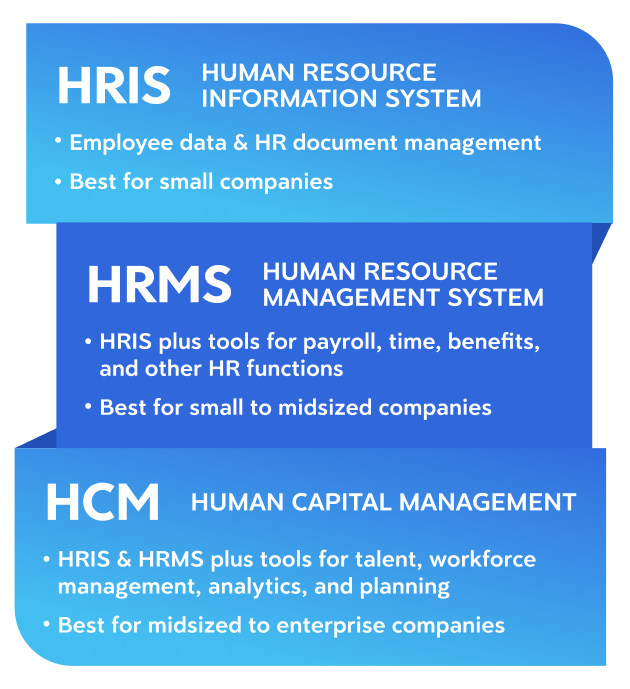
People sometimes think HRIS, HRMS, and HCM are interchangeable terms to describe HR software. And while all three are HR systems, they can also reflect different levels of functionality.
Here are working definitions, listed from least to most comprehensive:
Implementing an HRMS may be the right move if you need more than a system of record but are not yet looking for the broader capabilities of an HCM platform. But if you have (or plan to have) a global workforce or have more advanced analytics needs, evaluating HCM software might be the right call.
The need is real: In Dayforce research on organizational friction, 69% of employees said they have too many systems to get their work done, and 25% said processes are overly complicated.
The bottom line: An HCM system can help your HR department handle transactional people management tasks more efficiently and become a strategic partner with the company’s leadership team.
When you’re weighing HCM vs. HRIS vs. HRMS, it can be hard to tell which type of system fits your organization best. In many cases, these are signs that an HCM platform may be the better choice:
Here, we break down each term, compare them side by side, and explain when HCM software may be the right fit for your organization. That way, you can spend less time sorting through HR software alphabet soup and more time choosing technology that matches your goals.
Key takeaways
- An HCM system, HRIS, and HRMS overlap in some capabilities, but they are distinct tools.
- A human resource information system (HRIS) is the most basic HR software solution, focused primarily on storing and managing employee data.
- An HCM platform builds on human resource management system (HRMS) capabilities with broader functionality, including advanced reporting capabilities and tools that help support strategic workforce decisions.
- The right HR software for your organization will depend on your company’s size, budget, and goals.
- Your organization may need HCM software if it has outgrown its existing HR tech stack and needs a more comprehensive platform to support HR as a strategic function.
At a glance: HRIS, HRMS, and HCM
People sometimes think HRIS, HRMS, and HCM are interchangeable terms to describe HR software. And while all three are HR systems, they can also reflect different levels of functionality.
Here are working definitions, listed from least to most comprehensive:
- Human resource information system (HRIS): An HRIS is foundational software designed to store and manage employee data, such as personal information and employment history.
- Human resource management system (HRMS): An HRMS expands on HRIS functionality. These systems often include capabilities like applicant tracking systems (ATS) and advanced reporting.
- Human capital management (HCM) system: An HCM system builds on HRIS and HRMS capabilities with broader functionality across the entire employee lifecycle. These platforms typically include data analytics, global functionality, and AI tools.
What is an HRIS?
An HRIS helps organizations move beyond spreadsheets or disconnected records by creating a central place for employee data. In most cases, the system:- Shows team member information in one place
- Provides core HR functionality, such as organizational chart maintenance, document management, and basic reporting
What is an HRMS?
An HRMS expands on the core recordkeeping functions of an HRIS. An HRMS typically has modules for different HR functions, including:- Recruiting
- Benefits administration
- Time and attendance
- Payroll
- Training
- Performance management
Implementing an HRMS may be the right move if you need more than a system of record but are not yet looking for the broader capabilities of an HCM platform. But if you have (or plan to have) a global workforce or have more advanced analytics needs, evaluating HCM software might be the right call.
What is HCM software?
HCM software is a comprehensive suite of HR tools that supports the entire employee lifecycle. It generally includes the functionality of an HRIS and an HRMS, while extending into areas such as:- Talent management and workforce planning
- Analytics and reporting
- Automation, AI-powered assistants, and AI tools
- Global capabilities to support more complex workforces
What is HCM used for?
An HCM platform supports a wide range of workforce processes, helping organizations manage:- Employee data and document management
- Compliance management
- Recruiting and onboarding
- Benefits administration
- Time and attendance and payroll
- Performance management
- Employee development
- Reporting and analytics
- Workforce planning and modeling, including succession planning
- Global workforce management
- HR-related forecasting, such as predicting future staffing needs
The need is real: In Dayforce research on organizational friction, 69% of employees said they have too many systems to get their work done, and 25% said processes are overly complicated.
The bottom line: An HCM system can help your HR department handle transactional people management tasks more efficiently and become a strategic partner with the company’s leadership team.
Comparing HCM vs. HRIS vs. HRMS
The table below sums up the differences between HRIS, HCM, and HRMS:| HRIS | HRMS | HCM | |
|---|---|---|---|
| Main purpose | Employee data management | HR operations management | End-to-end workforce management and strategy |
| Scope | Employee data and HR document management | HRIS capabilities, plus tools for payroll, time, benefits, and other HR functions | HRIS and HRMS capabilities, plus talent, workforce management, analytics, and planning |
| Integration capabilities | Limited | Moderate | Extensive; Single HCM platforms with single data models help reduce integrations |
| Reporting capabilities | Basic | More advanced | Most advanced with data analytics |
| Scalability | Low | Moderate | High |
| Ideal company size | Small | Small to midsized | Midsized to enterprise |
Spot the signs: When do you need an HCM?
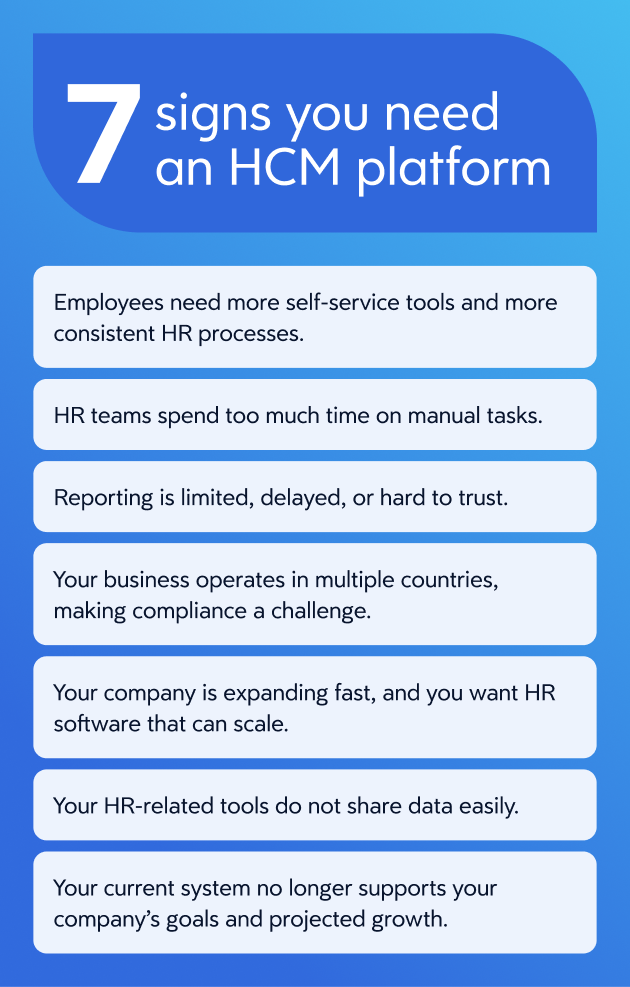
When you’re weighing HCM vs. HRIS vs. HRMS, it can be hard to tell which type of system fits your organization best. In many cases, these are signs that an HCM platform may be the better choice:
- You’re using several HR tools that don’t communicate with one another, creating extra work and reconciliation for your team.
- Your business operates in multiple countries, making compliance a challenge.
- Your company is expanding fast, and you want HR software that can support that growth.
- Leaders need better analytics to support workforce decisions and long-term planning.
- Employees and managers need more self-service tools and more consistent HR processes.
Choose the system that matches your workforce complexity
HRIS, HRMS, and HCM systems each serve different needs. They each can be appropriate for certain companies and situations. When considering your options, take into account:- Organization size and projected growth
- Budget and total cost considerations
- Business goals and workforce priorities
- The level of functionality you need
Frequently asked questions
What is the difference between HCM and HRIS?
When comparing HRIS vs. HCM platforms, the key difference is functionality. An HRIS is primarily designed to store and manage employee data, while an HCM platform supports a broader range of workforce processes and strategic functions.What is the difference between HRIS and HRMS?
An HRIS primarily houses employee data and allows you to run basic reports based on that information. An HRMS handles additional HR functions, offers more advanced reporting capabilities, and may include tools such as an ATS.What is the difference between HCM and HRMS?
An HRMS helps organizations manage HR processes more efficiently. An HCM platform goes further by connecting those processes with analytics, workforce planning, talent management, and broader business decision-making. In general, HRMS is more operational, while HCM is designed to support both operations and strategy.When is HRIS enough, and when do you need HCM?
An HRIS may be enough if your business has relatively straightforward HR needs and you’re looking to move away from spreadsheets and fully manual processes. However, if your company is growing and you need a more comprehensive HR software solution with AI capabilities, an HCM system may be worth a look.What are the signs your current HR stack has outgrown HRIS?
Here are four signs that your company has outgrown its current HR tech stack:- HR teams are spending too much time on manual tasks.
- You have several HR-related tools that do not share data easily.
- Reporting is limited, delayed, or hard to trust.
- Your current system no longer supports your company’s goals and projected growth.
You may also like:
Ready to get started?