HCM features checklist for HR, payroll, and finance leaders
Building an HCM requirements checklist starts with knowing what outcomes matter most to your organization. Here’s a practical look at the features worth evaluating and how to prioritize them across teams.


Table of Contents
Key takeaways
Before you start: What problem are you solving with an HCM suite?
HCM requirements checklist
HCM requirements to compare across vendors
Prioritizing HCM requirements across teams
Additional HCM requirements based on workforce complexity
Finding the best HCM for your business needs
Frequently asked questions
Table of Contents
Key takeaways
Before you start: What problem are you solving with an HCM suite?
HCM requirements checklist
HCM requirements to compare across vendors
Prioritizing HCM requirements across teams
Additional HCM requirements based on workforce complexity
Finding the best HCM for your business needs
Frequently asked questions
Finding the best HCM for your business needs starts with asking a simple question: How will this platform support the way your organization actually works?
Leaders don’t want a solution that forces them to completely overhaul every process and workflow. They want a single system that adapts to how they do business while providing reliable data for decisions around growth, staffing needs, payroll, and compliance.
Let’s look at the requirements worth prioritizing as you evaluate modern HCM software options.
Do you want cleaner workforce data with detailed reporting and real-time access? More reliable payroll? Better visibility into labor costs? Answering these questions early makes it easier to identify which HCM features are most critical for your organization.
Starting with a clear sense of purpose puts you in the mindset to separate must-have requirements from flashy capabilities that aren’t relevant to your organization’s needs.
Here are some common HCM requirements to consider as you evaluate solutions:
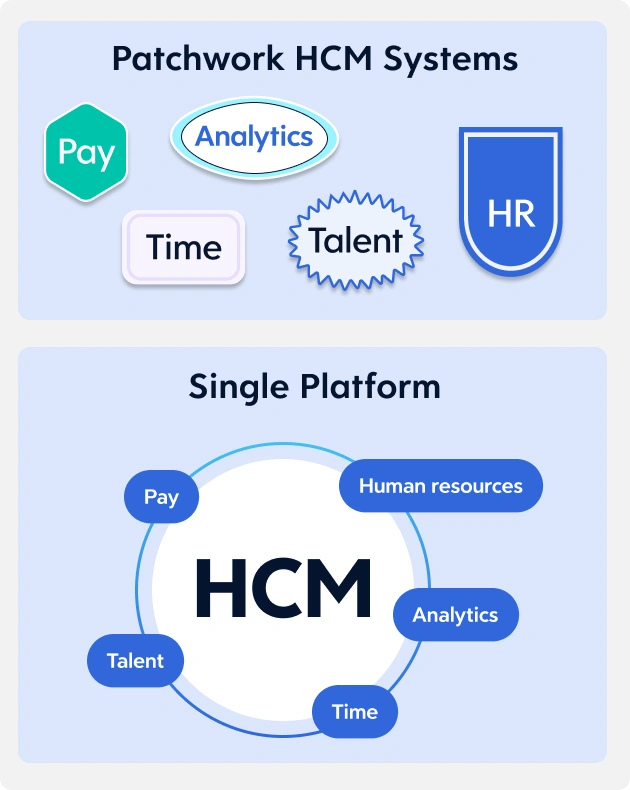
Some “unified” systems still rely on separate modules pieced together through integrations. This can create inconvenient gaps between HR, payroll, operations, and workforce data.
Single platforms keep all data in one place. This no-patchwork setup can translate to less reconciliation work and more confidence in the reports that drive operational and financial decisions.
When system workflows reflect how work moves through your operation, employee adoption comes more naturally. It also sets up managers to spend less time navigating complex tools.
When payroll and HR data live in the same system, compliance oversight gets more manageable and teams spend less time chasing down corrections.
Real-time insight into hours worked and planned coverage enables leaders to respond more quickly when labor costs shift.
When leaders can easily access and interpret this data, decisions move faster and with greater confidence. Tools that support people analytics help leaders identify workforce trends and plan more deliberately.
Resources on HR analytics show that data-driven insight, often powered by AI and predictive analytics, can guide workforce strategy and long-term planning for your organization.
Scalability factors into the long term as well. A platform built to grow with your organization reduces the need for costly rework down the line and limits the security exposure that can come with frequent system changes.
The HCM features that work for a smaller, single-location company may fall short in a more complex environment. Even similar challenges in similar organizations vary by operational and workflow nuance.
As leaders evaluate platforms, it helps to consider how factors such as workforce structure and future growth plans shape system requirements. Here are some examples:
A cross-functional selection committee can help ensure the requirements you prioritize reflect the needs of the whole organization. That way, you’re not just chasing one team’s wish list.
For a deeper look at evaluating solutions and selecting the right vendor, explore our complete HCM software buyer’s guide.
Leaders don’t want a solution that forces them to completely overhaul every process and workflow. They want a single system that adapts to how they do business while providing reliable data for decisions around growth, staffing needs, payroll, and compliance.
Let’s look at the requirements worth prioritizing as you evaluate modern HCM software options.
Key takeaways
- Start with outcomes, not lists of features. A well-structured HCM requirement checklist keeps the focus on capabilities that support payroll reliability, workforce insight, and decision-making.
- Platforms built on a single data model help cut down on reconciliation work and give leaders greater confidence in reporting.
- Different stakeholders have different priorities. Bringing HR, payroll, finance, and IT together early helps you compile a more complete set of requirements.
- Workforce complexity shapes the final decision. Growth plans and staffing models often determine which HCM features will deliver the most long-term value.
Before you start: What problem are you solving with an HCM suite?
Before comparing HCM features, step back and define the problems you’re trying to solve.Do you want cleaner workforce data with detailed reporting and real-time access? More reliable payroll? Better visibility into labor costs? Answering these questions early makes it easier to identify which HCM features are most critical for your organization.
Starting with a clear sense of purpose puts you in the mindset to separate must-have requirements from flashy capabilities that aren’t relevant to your organization’s needs.
HCM requirements checklist
Before we dig into non-negotiable HCM features, it helps to grasp the broader capabilities leaders typically evaluate when selecting a platform. Organizing these as a checklist keeps the process focused on outcomes rather than vendor feature counts.Here are some common HCM requirements to consider as you evaluate solutions:
| Requirement/capability | Primary owner | Outcome supported | How to validate |
|---|---|---|---|
| Single data model | HR, IT | Trusted reporting and fewer data reconciliations | Confirm whether HR, payroll, and time share a single data model |
| Configurable workflows | HR, Operations | Consistent processes and higher buy-in and adoption | Review approval flows and policy automation during demos |
| Payroll accuracy and compliance | Payroll, Finance | Reduced errors/ corrections and stronger regulatory compliance | Evaluate audit trails, role management, and reporting tools. |
| Time and scheduling visibility | Operations, Finance | Better control over labor costs | Test overtime alerts, scheduling tools, and manager dashboards |
| Reporting and people insights | HR, Leadership | Clear workforce trends and faster decision-making | Review cross-domain reporting capabilities |
| Workforce planning and forecasting | HR, Finance | More informed staffing and budget planning | Assess scenario planning and forecasting features |
| Security and access controls | IT, HR | Protection of sensitive employee data | Confirm role-based permissions, audit logging, and vendor support |
HCM requirements to compare across vendors
With your priorities defined, it’s time to evaluate HCM features in earnest. Here are the capabilities leaders often compare when assessing modern platforms.Data model and a single source of truth
The data model that powers your HCM platform determines the accuracy and reliability of your reporting. It also dictates how much time your team spends reconciling missing or mismatched data.Some “unified” systems still rely on separate modules pieced together through integrations. This can create inconvenient gaps between HR, payroll, operations, and workforce data.
Single platforms keep all data in one place. This no-patchwork setup can translate to less reconciliation work and more confidence in the reports that drive operational and financial decisions.
Workflows that match how work actually happens
Technology works best when it fits naturally into existing processes. Look for HCM solutions that offer customizable workflow capabilities across approvals, policy checks, guardrails, and role-based tasks across departments.When system workflows reflect how work moves through your operation, employee adoption comes more naturally. It also sets up managers to spend less time navigating complex tools.
Payroll and compliance confidence
Payroll accuracy depends on consistent employee data and clear policy enforcement. Look for HCM features that include audit trails and automated rule checks so payroll pulls directly from the most current workforce records.When payroll and HR data live in the same system, compliance oversight gets more manageable and teams spend less time chasing down corrections.
Time, scheduling, and labor cost visibility
Labor is one of the highest operating costs for organizations. A strong HCM platform gives managers clear visibility into scheduling and overtime exposure, with built-in policy guardrails that support more informed staffing decisions before costs escalate.Real-time insight into hours worked and planned coverage enables leaders to respond more quickly when labor costs shift.
Reporting, people insights, and decision support
Cross-domain reporting that combines information from HR, payroll, workforce, and operations is another HCM requirement worth prioritizing.When leaders can easily access and interpret this data, decisions move faster and with greater confidence. Tools that support people analytics help leaders identify workforce trends and plan more deliberately.
Advanced analytics and workforce planning
Some HCM platforms go beyond reporting to offer forecasting and workforce modeling, helping organizations evaluate hiring scenarios and understand how future labor demands may affect budgets.Resources on HR analytics show that data-driven insight, often powered by AI and predictive analytics, can guide workforce strategy and long-term planning for your organization.
Security and scalability
Security and scalability become increasingly important as your organization grows. It’s even more critical during an era when cyberattacks and ransomware are more common. That’s why it can be a good move to put role-based access controls, audit logs, encryption, and other safeguards that protect sensitive employee information among your HCM requirements.Scalability factors into the long term as well. A platform built to grow with your organization reduces the need for costly rework down the line and limits the security exposure that can come with frequent system changes.
Prioritizing HCM requirements across teams
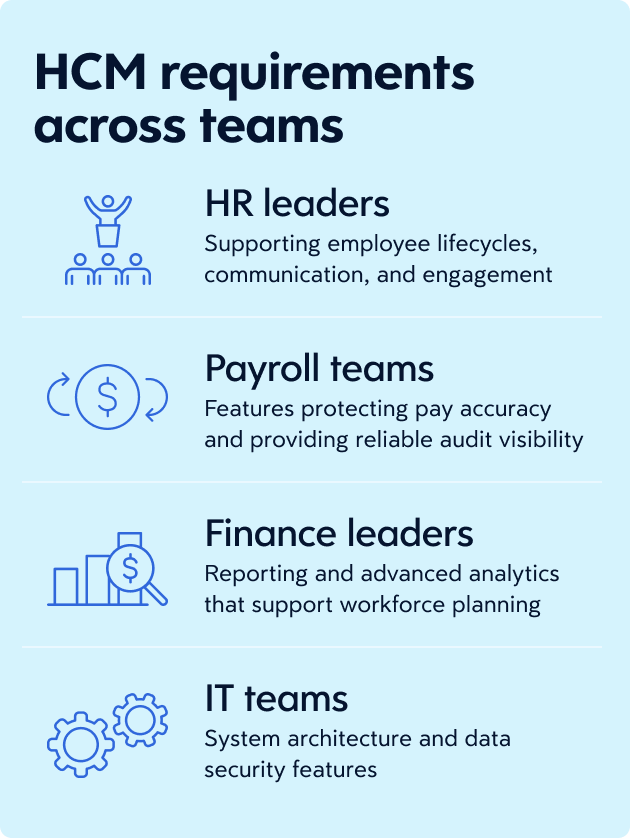
Different stakeholders approach HCM requirements from different angles. Clarifying what matters most to each group, and giving each a voice early in the process, leads to a more complete and defensible set of requirements.- HR leaders typically prioritize capabilities that support employee lifecycles, workforce visibility, communication and engagement, and tools that help managers guide day-to-day people discussions.
- Payroll teams look closely at features that help manage pay accuracy and provide reliable audit visibility.
- Finance leaders want trusted reporting and advanced analytics that help them understand labor costs so they can plan for changes in staffing.
- IT teams evaluate system architecture along with the controls that protect employee data.
Additional HCM requirements based on workforce complexity
No two organizations experience the same operational challenges.The HCM features that work for a smaller, single-location company may fall short in a more complex environment. Even similar challenges in similar organizations vary by operational and workflow nuance.
As leaders evaluate platforms, it helps to consider how factors such as workforce structure and future growth plans shape system requirements. Here are some examples:
- Multi-geo operations: Organizations that operate across various regions often need localization capabilities that support different labor regulations and data privacy rules.
- Multiple worker types: Companies with hourly employees, salaried managers, contractors, or unionized staff may require more flexible pay rules and workforce policies that must adapt to changing staffing configurations.
- Frontline-heavy workforces: Mobile access and straightforward time clock tools help managers and employees quickly finish tasks without having to navigate complicated systems.
- Organizations undergoing change: Companies experiencing rapid hiring or structural shifts can benefit from HCM features that handle workforce transitions without continual system adjustments.
Finding the best HCM for your business needs
The right HCM platform connects system capabilities to real business outcomes. Leaders tasked with evaluating HCM features should focus on outcomes. That means seeking out features that support workforce visibility, reliable payroll operations, and the planning insights your organization depends on.A cross-functional selection committee can help ensure the requirements you prioritize reflect the needs of the whole organization. That way, you’re not just chasing one team’s wish list.
For a deeper look at evaluating solutions and selecting the right vendor, explore our complete HCM software buyer’s guide.
Frequently asked questions
What are the must-have HCM features?
The most important HCM features support reliable workforce data and everyday operations. Leaders often look for a single HCM data model, dependable payroll processing, flexible workflows, and reporting tools that make workforce information easier to act on.What should be included in an HCM requirements checklist?
An HCM requirements checklist outlines the capabilities each team needs from the platform. HR may focus on employee lifecycle tools, payroll teams on pay accuracy and compliance support, and IT on architecture and security controls. The goal is to document how the system will support real work across the organization.How do you prioritize HCM requirements across HR, payroll, and IT?
Start with shared outcomes. Payroll teams care deeply about accuracy. HR leaders want reliable workforce insight. IT emphasizes security and system design. Once you define your priorities, it’s easier to identify what capabilities are essential and which you can phase in later.How does HCM support workforce planning and labor forecasting?
Modern HCM platforms bring workforce data together so leaders can evaluate staffing needs with greater confidence. Reporting tools help teams understand current trends, while advanced analytics can support scenario planning for hiring, scheduling, or future labor demand.Which HCM features improve payroll accuracy and compliance?
Features that pull payroll and HR data into the same system are invaluable. Audit visibility and automated rule checks make it easier to spot problems early and help payroll teams maintain stronger oversight when compliance questions come up.You may also like:
Ready to get started?