AI within HCM systems: Value, governance, and risks
For CHROs, CIOs, and other executives evaluating AI-powered HR solutions, the practical questions matter most. Where does AI actually fit in day-to-day workflows? What does good governance look like? And how do you get measurable outcomes without introducing risk that your organization isn’t prepared to manage?


Table of Contents
You’ve probably heard a lot of buzz about AI-powered HR solutions — but separating real value from hype is harder than it looks. Many platforms promise AI-powered insights, automation, and efficiency. But not all AI delivers meaningful outcomes, and not all of it can be governed, audited, or trusted at scale.
This guide focuses on where AI in HCM actually creates value — and how to evaluate an HCM platform with a clear lens on governance, auditability, and long-term risk.
For higher-stakes scenarios, such as hiring or compensation, AI should support — not replace — human decision-making. The system provides insights or recommendations, while humans review and approve final decisions.
AI built into an HCM platform designed around a single data model helps improve performance across HR, from day-to-day execution to long-term workforce planning. Its benefits include:
Because HCM platforms vary in how they deliver AI, it’s important to evaluate them using a clear and consistent set of criteria. Here’s what a step-by-step process might look like:
That’s why responsible AI starts before you sign a contract. Take the time to thoroughly evaluate your options.
To learn more about AI-powered HR solutions and how to choose an HCM system, explore our complete HCM software buyer’s guide.
This guide focuses on where AI in HCM actually creates value — and how to evaluate an HCM platform with a clear lens on governance, auditability, and long-term risk.
Key takeaways
- AI in HCM can speed up decision-making, automate routine work, and generate insights — but only when built on a strong platform foundation.
- AI effectiveness depends on a single HCM platform and data model — fragmented systems limit accuracy, scalability, and trust.
- Responsible AI adoption requires strong governance, including transparency, bias monitoring, explainability, and ongoing model quality management.
- Organizations must ensure AI-assisted decisions are accountable, traceable, and auditable.
- Organizations must ensure AI can be configured and controlled by region, role, and use case to meet evolving regulatory requirements.
Creating value with AI-powered HR solutions
AI drives adoption in HR when it reduces manual work and supports better decisions — freeing teams to focus on higher-value, human-centered work. It can help organizations:- Enable self-service in the flow of work, helping employees find answers quickly while reducing HR support needs.
- Automate routine and repetitive tasks to free up more time for higher-value work
- Forecast future hiring needs and proactively flag turnover risk before issues escalate.
- Support better, real-time decisions by delivering insights and recommendations directly in the flow of work.
For higher-stakes scenarios, such as hiring or compensation, AI should support — not replace — human decision-making. The system provides insights or recommendations, while humans review and approve final decisions.
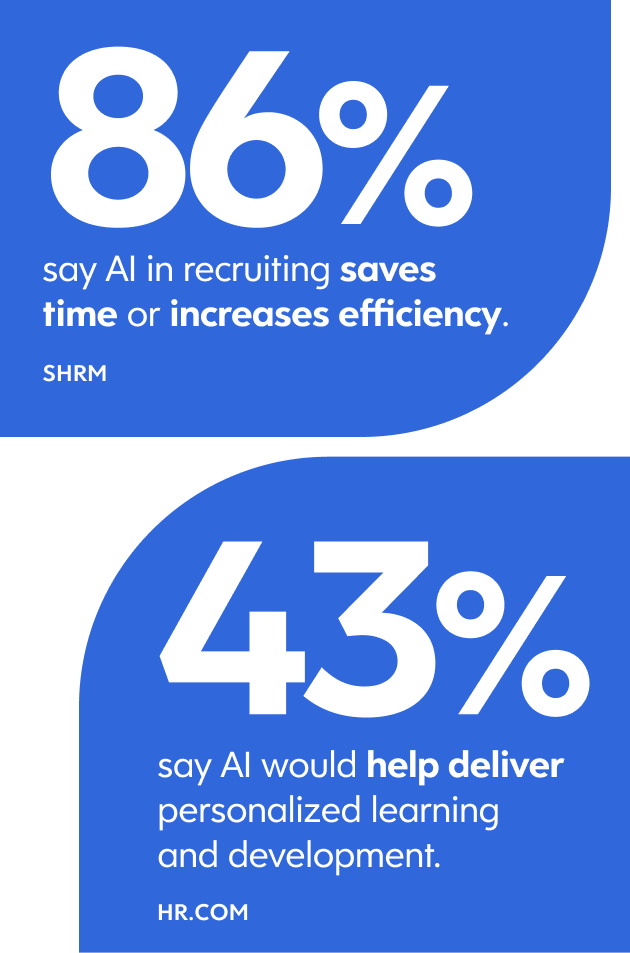
AI built into an HCM platform designed around a single data model helps improve performance across HR, from day-to-day execution to long-term workforce planning. Its benefits include:
- Efficiency and productivity: The Society for Human Resource Management (SHRM) found that 89% of HR professionals whose organizations use AI in recruiting say it saves time or increases efficiency.
- Employee experience: In HR.com’s 2025 HR Technology and Integrations research, 57% of respondents said more AI would improve employee self-service, and 43% said it would lead to better personalized learning and development.
- Forecasting and strategic planning abilities: Deloitte notes that AI is already transforming workforce planning by improving demand-and-supply forecasting and helping leaders simulate workforce changes in response to disruption.
Practical use cases of AI in HCM software
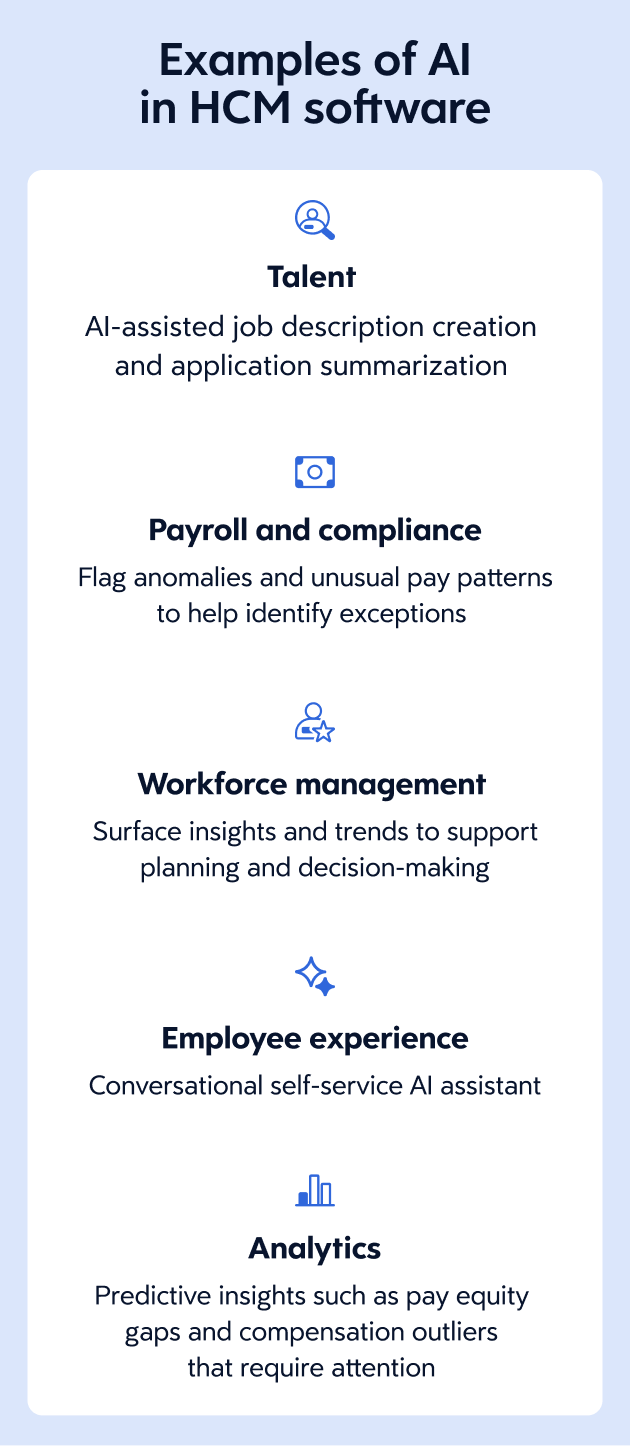
AI-powered HCM solutions create the most value when they take friction out of everyday workflows and deliver insights that leaders can act on. Here’s how AI can support key HR functions, from talent to payroll to workforce management and more.
Talent
AI in talent can improve hiring and development decisions across the employee lifecycle by helping teams:- Support recruiters in assessing candidates with AI-driven insights based on role fit and characteristics of successful hires
- Improve recruiting efficiency with AI-assisted job description creation and application summarization
- Personalize onboarding and learning to support skill development and career growth
- Enable internal mobility by identifying skills, performance signals, and role matches
- Surface insights from employee feedback to guide talent decisions
Payroll and compliance
In payroll and compliance, AI is most valuable when it helps teams access information quickly, reduce rework, and automate routine tasks to improve efficiency. Within an HCM platform, AI can help:- Explain employee pay details and identify differences between pay periods, improving transparency and reducing payroll-related inquiries.
- Classify employee pay and highlight key drivers or equity indicators to support more informed compensation decisions.
- Provide fast, conversational access to payroll information and workflows through AI assistants and agents.
- Monitor compliance continuously and proactively surface potential risks to administrators
- Flag anomalies and unusual pay patterns to help identify exceptions, reduce manual audit effort, and improve payroll accuracy.
Workforce management
Integrating AI workforce planning with HCM can help improve planning accuracy, streamline employee requests, and support more efficient workforce decisions by:- Forecasting labor demand using historical data, seasonality, and external factors to support short-term workforce planning
- Enabling employees to check balances and submit accurate, policy-compliant time-off requests
- Provide conversational access to workforce information and tasks for employees and managers
- Surface workforce insights and trends to support planning and decision-making
- Highlight potential workforce risks, such as coverage gaps or anomalies, for earlier action
Employee experience
AI-powered HCM solutions improve the employee experience by enabling fast, conversational self-service in the flow of work. Instead of submitting tickets or waiting for answers, employees can use an AI assistant to ask questions about:- Pay statements and timing
- Benefits and eligibility information
- Time-off balances and requests
- Training requirements and opportunities
- HR policies and company documents
Analytics
An HCM platform enhanced with AI delivers deeper, more actionable insights beyond traditional HR metrics. For example, AI can help uncover and predict insights such as:- Hiring demand based on business plans and staffing trends
- Employees at risk of leaving
- The impact of how growth, restructuring, or policy changes could affect the workforce
- Pay equity gaps and compensation outliers that require attention
Evaluating AI use within an HCM system
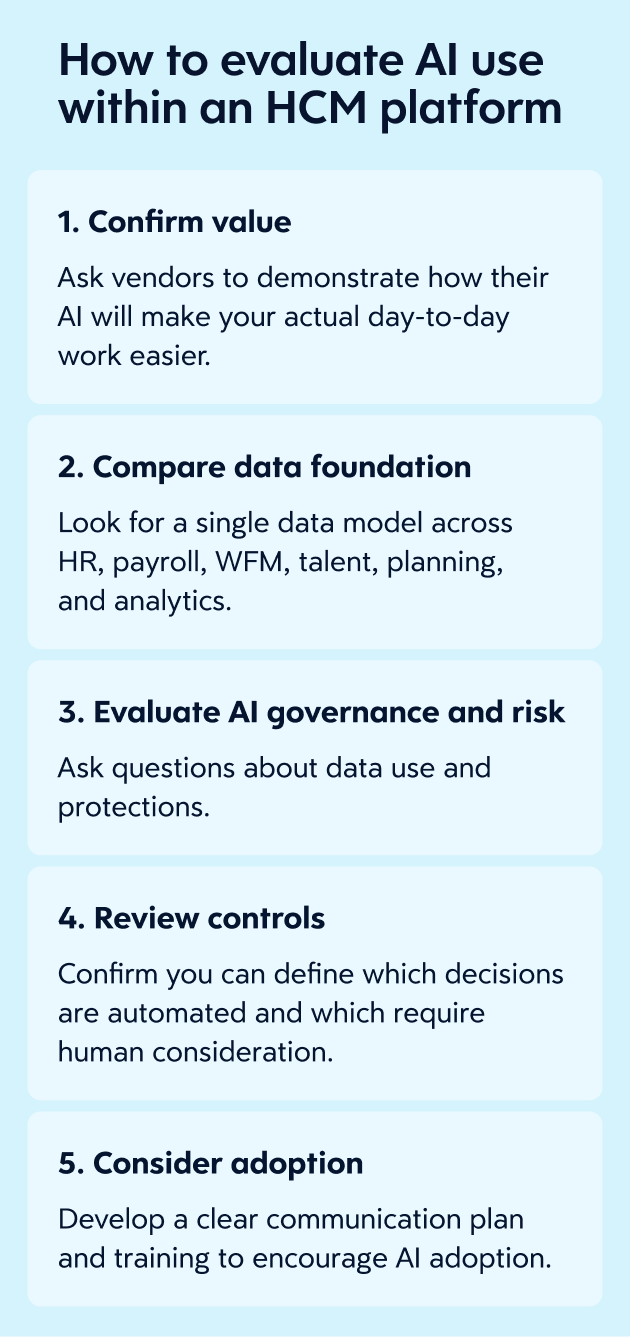
The AI experience shows up differently across HCM platforms. It might be an AI assistant that answers questions and summarizes, an AI agent that automates multi-step workflows, or an AI-enhanced analytics layer designed for forecasting and risk detection — or some combination of these.Because HCM platforms vary in how they deliver AI, it’s important to evaluate them using a clear and consistent set of criteria. Here’s what a step-by-step process might look like:
1. Confirm value
AI capabilities are easy to demonstrate but much harder to operationalize. Many solutions showcase impressive features that don’t translate into meaningful impact in day-to-day work. To separate real value from AI hype, ask vendors to demonstrate how their AI will:- Make your actual day-to-day work easier (for example, less manual re-entry, fewer handoffs, faster approvals, quicker answers to common questions)
- Raise the quality of decisions, not just the speed of tasks
- Facilitate planning and workforce decisions with clear, actionable insights
- Connect to business outcomes tracked by your leadership
- Operate within your existing workflows, rather than requiring workarounds or additional steps
2. Compare data foundation
AI is only as effective as the data and architecture behind it. When data is fragmented across systems, AI outputs become harder to trust, explain, and scale. To evaluate whether an HCM platform can support reliable, enterprise-grade AI, look for:- A single data model across HR, payroll, workforce management, talent, planning, and analytics
- Workflows governed by a shared rules engine, rather than data moving between disconnected systems
- AI that can use relationships across the employee life cycle, not just within one module
- A consistent user experience across HR, pay, time, talent, and analytics
3. Evaluate AI governance and risk
Next, as AI becomes more embedded in workforce decisions, governance, transparency, and control are critical. Without clear safeguards, AI can introduce compliance, ethical, and operational risk. Here’s a non-exhaustive list of questions you should ask your vendor:- What personal data (including employee data) does the AI use, and how is it sourced and governed?
- How is sensitive data protected?
- Is customer data used to train shared models across clients? If so, how is it isolated and controlled?
- Can AI capabilities be configured, limited, or disabled by region, role, or use case?
- How transparent are AI outputs? Can decisions be explained and audited?
- How do you monitor AI for bias, model drift, or unintended outcomes over time?
- Do you align to recognized frameworks such as the NIST AI Risk Management Framework or ISO/IEC 42001?
- How do you keep up with regulatory changes?
4. Review controls
AI requires clear guardrails, especially when it influences decisions that impact employees. Confirm you can:- Define which decisions are automated and which require human consideration
- Set clear boundaries for when and how AI outputs can inform decisions
- Disable or adjust AI features by role, location, and other relevant criteria
- Ensure AI follows the same privacy, security, and data governance rules as the rest of the HCM platform
5. Consider adoption
AI is only valuable if people actually use it. Adoption depends on how well AI is embedded into everyday workflows and whether it delivers value at the moment decisions are made. Your rollout plan should help end users understand:- How AI will change their work
- What AI can do
- What AI can’t do
- How decisions stay accountable and documented
- How to think critically about AI’s outputs — and when to apply human judgment
Ensuring responsible use of AI in HR solutions
Organizational leaders aren’t buying AI for its own sake. They’re buying outcomes, such as faster execution and better control over costs and risk.That’s why responsible AI starts before you sign a contract. Take the time to thoroughly evaluate your options.
To learn more about AI-powered HR solutions and how to choose an HCM system, explore our complete HCM software buyer’s guide.
Frequently asked questions
What does AI in HCM mean in practical terms?
AI tools within an HCM system enable the software to go beyond storing and retrieving data by helping analyze information, surface insights, and support actions within workflows. In practice, this means teams can make faster, more informed decisions without relying on manual processes. Examples of how that shows up for HR teams include:- AI assistants that answer employee questions and provide guidance
- AI agents that support multi-step workflows and reduce manual effort
- AI-powered tools that generate learning content and recommend development paths
What are the best AI use cases for HR and payroll teams?
The most valuable AI use cases are those that reduce manual work, support better decisions, and fit naturally into everyday workflows. Common high-value use cases include:- Answering employee questions through self-service assistants
- Extracting key information from applications and supporting recruiter review
- Suggesting learning paths for team members
- Suggesting employee work schedules or staffing adjustments
- Projecting staffing needs
- Identifying potential compliance issues
How does AI integration with an HCM system work?
AI tends to work best when it is embedded into the HCM platform and draws from the same underlying data and rules. That helps reduce handoffs and can make it easier to apply governance controls across workflows.What data is required to make AI in HCM effective?
AI needs a high volume of accurate data to learn about your company and offer sound business advice. When data sits within a single HCM platform, AI can draw on information across HR, payroll, talent, and workforce management to provide more relevant and timely outcomes. Data from across the employee lifecycle — applicant tracking systems (ATS), learning management systems (LMS), and other HR software — helps improve results, but strong governance is still required.How do AI agents for HR impact workflows and change management?
AI agents simplify and automate common HR tasks — from time and pay support to content generation and insights — reducing manual effort and improving efficiency. They work best within clear rules and still require oversight to manage exceptions and ensure accountability.You may also like:
Ready to get started?